

A common frustration for machinery, device and equipment manufacturers is a production flow grinding to a halt because of a disagreement over which ‘version’ of the bill of materials is the right one. For example, if engineering revised a bracket spec in May, purchasing ordered against the March parts list, and the box that arrived on the shop floor holds brackets that no longer fit the assembly. All three departments were working from a bill of materials, but neither of them was working from the same one.
BOM management is the practice of keeping a single controlled bill of materials that design, purchasing and production all work from, with the revisions, quantities and suppliers attached to it, so the version being built is the version that was approved.
If you make equipment, machinery, instruments or devices in batches of ones and tens, with a few hundred parts in every unit and a fair amount of customisation, this is written for you. Many scaling manufacturers with smaller production teams do not have a formal BOM process, relying on staff knowledge and communication within a tight team to maintain consistency. However, as the team grows and the complexity deepens, the margin for error undoubtedly increases.
In brief: A bill of materials lists everything that goes into a product, and BOM management is the discipline of keeping that list accurate as the product is designed, built, shipped and serviced. SME equipment manufacturers usually run into trouble when the same BOM exists in several places at once, with no reliable way to tell which copy is current. This guide covers multi-level BOMs, the different views of a BOM through a product’s life, revision control, and where spreadsheets stop coping.
What BOM management is
BOM management is the process of creating, structuring and controlling a product’s bill of materials so that every department works from the same version. It covers the parts and quantities in each assembly, the revision history behind them, the approved suppliers for each item, and the links from the BOM through to purchasing, production and stock.
An incorrect BOM shows up as a late delivery, an unbudgeted courier charge, an engineer standing idle, and often, a margin that disappears between quote and invoice.
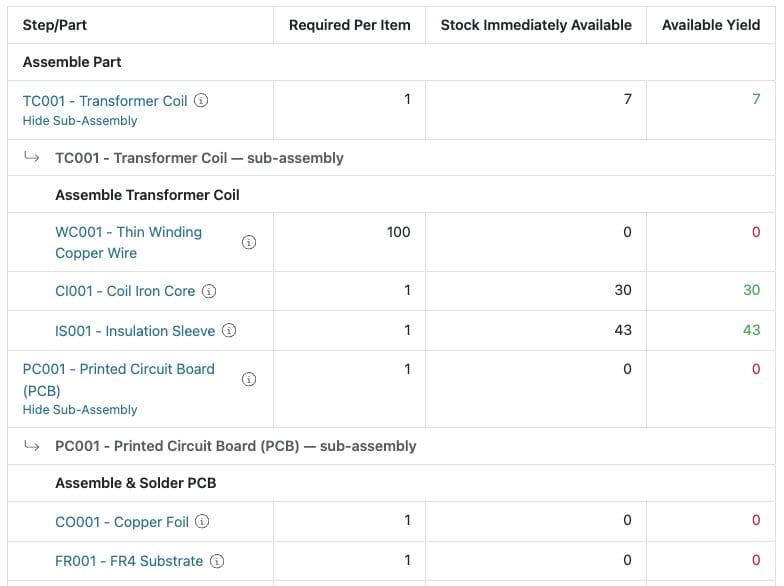
Single-level and multi-level BOMs
A single-level BOM is a flat list, with the finished product at the top and every component directly underneath it. That works for simple assemblies built entirely from bought-in parts.
A multi-level BOM has depth and complexity. The product is made from sub-assemblies, each with its own parts list, and some of those parts are assembled in-house too. A control panel for an extraction system might break down like this:
Control panel CP-200
- Enclosure assembly
- Steel enclosure, powder coated (subcontracted)
- Gland plate
- Wiring loom assembly
- Cable, 2.5mm, 14 metres
- Ferrules and cable ties, as required
- PLC module
- Terminal rail
Three levels and a dozen lines is manageable in a spreadsheet. The same product with 250 parts, a subcontracted finishing operation and three variants is not. As Tim Morgan, MD and Inventor at The Mountain Trike Company, put it:
“As demand for our products has grown worldwide, our manual ways of working are no longer fit for purpose. Our all-terrain mobility products are made up of several sub-assemblies with their own bill of materials, and staying on top of the stock requirements had become a particular challenge.”


The five views of a BOM
One product generates several bills of materials over its life. Larger manufacturers formalise these and name them. Smaller ones usually have all five in some form, scattered across CAD, spreadsheets and printouts, without calling them anything, and that can be where problems arise (although BOM management is challenging no matter the size of your operation!).
The design structure
The geometry in your CAD system: models, drawings, assemblies and the parent-child relationships between them. This is where part numbers and quantities originate, and why so many BOMs begin life as a CAD export.
The engineering BOM
The product as designed and approved, including non-CAD items such as adhesives, labels and firmware that never appear in the model. This is the version an engineer would recognise as the definitive description of the product.
The manufacturing BOM
The same product described the way it is actually built, which is rarely identical to the engineering view. It adds consumables, approved alternates for parts on long lead times, and the sub-assembly structure the shop floor works to.
The as-built record
What actually went into a particular unit, with serial and batch numbers against the components used. Sean Taylor, MD at Horizon Wiring, describes why that matters:
The serial numbers, for example, and offering that traceability to customers from beginning to end on a build. Even if it comes back for a service, we can use that serial number to re-enter the product back into our hands.
The service BOM
The product structured for maintenance: serviceable assemblies, spare parts and replacement rules. It is what a field engineer needs in front of a machine built four years ago.
There is a sixth BOM that some manufacturers use, the sales BOM, which groups finished products sold together as a set or a kit. It contains completed items and no sub-assemblies, and it is mostly relevant if you make to stock.
Revisions, changes and where-used
Every one of those views can change, and the point of BOM management is knowing what changed, when, and what else it affects.
Two habits are useful here. The first is proper revision control, so each BOM carries a version, a date and a record of what was altered, and so a job card shows which revision that unit was built to. The second is the ‘where-used’ lookup, which answers the question that comes up every time somebody proposes a change: which other products contain this part?
Engineer-to-order work makes both harder, since long-lead items get ordered before the design is finished and changes sometimes land mid-build. That can be managed, as long as the change is recorded somewhere other than an engineer’s inbox or sketched on the back of a notepad on a production operative’s workbench!
Where spreadsheets fail
Spreadsheets are fine at the start, but they fail in predictable ways. Copies drift apart, because purchasing keeps one version and production prints another.
Cost roll-ups break, since a price change three levels down does not propagate back up to the top line cost. Where-used becomes impossible, as nobody wants to open 60 files to find every product containing one washer. Nothing in a spreadsheet might connect the BOM to actual stock levels, so the parts list cannot tell you whether the parts are on the shelf or at the end of a long lead time, which is the question you needed answered.
Our guide to moving off spreadsheet stock control goes into the stock side of this in more detail.
Bringing the BOM into one workflow
What replaces the spreadsheet is a single BOM the rest of the business reads from. Purchasing raises orders against it, job cards pull it through to the shop floor, stock levels reflect what has been committed to jobs, and serial numbers link the finished unit back to the parts fitted. Costs then flow through to Xero, Sage 50 or QuickBooks without anyone re-keying a parts list.
That is the shape of what BOM software does inside an MRP system, and it is how Flowlens handles bills of materials for equipment manufacturers: multi-level structures, revision history, approved suppliers per part, and batch and serial traceability through to service.
Conclusion
BOM management is not a software problem immediately. It is the discipline of deciding which version is the truth and making sure everyone builds to it. Most SME equipment manufacturers already have the five views above somewhere in the business, and the difference between a smooth build and a stopped one is usually whether those views agree.
Ready to Start Your Digital Journey?
We’ve analysed hundreds of successful MRP implementations, and in this FREE e-book, we break down the essential steps you need to follow to ensure your digital transformation is a success.

FAQs about BOM Management
What is the difference between an engineering BOM and a manufacturing BOM?
An engineering BOM describes the product as designed, and usually comes out of CAD. A manufacturing BOM describes how the product is actually built, adding consumables, approved alternates and the sub-assembly structure the shop floor uses. Smaller manufacturers often maintain one list that tries to serve both purposes.
What is an as-built BOM used for?
Lorem ipsum dolor sit amet, consectetur adipiscing elit. Ut elit tellus, luctus nec ullamcorper mattis, pulvinar dapibus leo.
What is a where-used report?
A where-used report lists every product and sub-assembly that contains a given part. It is the check you run before changing or discontinuing a component, so you know which other builds the change affects.
Flowlens is MRP and CRM software built for SME equipment, machinery and device manufacturers and designed to handle the complexities of this sector.
Book a discovery call to see how it could handle your bills of materials.