It’s been a busy six months on Flowlens version 2. Rather than a long list of changelogs, we’ve pulled together the headline features from the last half-year and grouped them around what actually matters to you as a manufacturer: staying in control on the shopfloor, being ready for any audit at any time, and having the visibility you need to grow with confidence. Click on any item below to read more details in our release notes, and if you’ve any questions please get in touch with the team via support@flowlens.com.
Audit-Ready Traceability
ISO 9001 certification, and just good manufacturing practice, depends on being able to show exactly what happened to every part, every batch, and every decision. These releases add several new layers of control and evidence.
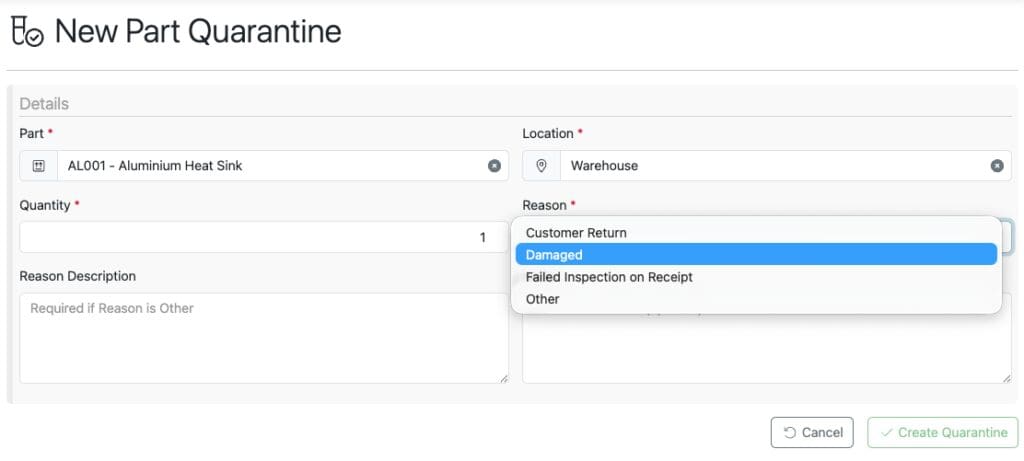
Quarantine Stock lets you pull damaged or unverified stock out of general availability the moment an issue is spotted, with location, quantity and reason captured against the Part record, so quarantined items never get counted as available and the paper trail is there when you need it.
Scrap Stock does the same for stock that’s beyond use, whether it’s damaged mid-job or written off in the warehouse. Every scrappage, including against serialised parts, now flows through into a dedicated Stock Scrappages report and the Part Cost Lost transactions report, so the financial impact of waste is visible, not buried.
De-allocation of Stock gives you a controlled way to release stock that’s tied up against a Sale or Job Card when priorities shift, and reallocate it cleanly rather than working around the system.
The Sub-Assembly BOM Viewer now lets you drill into child components and available stock without losing your place.
On the purchasing side, the new Purchase Order Approvals Workflow puts financial sign-off in front of supplier commitments — set approval limits per user, route requests automatically, and filter POs by approval status. Paired with the newly expanded Job Card Activity Log, which now records exactly who picked what stock and when, and who completed which step, you’ve got a much stronger audit story from purchase order through to finished job.
Staying in Control on the Shopfloor
Real production rarely runs to plan: orders change, orders ship in stages, suppliers run late. This release cycle focused on giving you the flexibility to handle those situations without losing control.
Partial Job Card Completion means finished product doesn’t have to wait for the rest of the batch — release what’s ready for dispatch while production continues on the remainder. And Shopfloor App Filters make it faster for operators to find the Job Cards and steps that matter, filtering by status and priority.
On the order side, Sales Order Revisions let you amend confirmed orders: adding lines, adjusting prices and descriptions, even after partial dispatch; with a full revision history and revision number printed on the PDF. Dispatching Partially Fulfilled Sales Orders means you’re no longer stuck waiting for 100% stock availability before you can ship, and you can now dispatch directly from a Sale rather than building a separate dispatch record. When an order’s remaining balance simply isn’t going to be fulfilled, Sales Clear Down closes it out cleanly.
The same flexibility now applies upstream: Purchase Order Clear Down handles POs that are no longer going to be (fully) fulfilled, while the new PO Receipts Tab gives a clearer picture of what’s been received against what’s outstanding right inside the PO. And for multi-site operations, Organisation Location Selections now tie stock movements, dispatches and receipts to the correct location throughout the system, cutting down on cross-site mix-ups.
Visibility to Support Scalable Growth
As you grow, decisions need to be backed by numbers, not gut feel. Several new reports and configuration tools landed this half-year to give you a clearer, more flexible view of the business.
For profitability, the new Sales Order Profitability report rolls costs and revenue up to the order level, while the Part Cost Lot Transactions report lets you trace every transaction affecting part cost: imports, dispatches, consumption, scrappage and receipts, in one place. The Sales Order Line Item Dispatch and Invoicing report helps you keep on top of cashflow by spotting what’s shipped but not yet invoiced, and the new Manufactured Part-BOM report gives a full breakdown of child parts, current cost and supplier info for any manufactured part.
Supplier performance is easier to hold to account too, with new On Time Delivery reports at both the line-item and Purchase Order level.
On the configuration side, Custom Fields let you extend Flowlens with your own fields — starting with Sales — so the system flexes to fit how your business works, not the other way round. Default PDF Text lets you manage terms, conditions and legal text centrally, with overrides available per customer and per document type.
That’s the headline view — smaller fixes and refinements have shipped alongside all of these. For the full detail on any release, visit the Flowlens Help Centre, or get in touch if you’d like to see any of these features enabled on your system.