
BOM Management Software for SME Equipment Manufacturers
Cut the admin around your bill of materials with Flowlens, the integrated MRP system built for equipment, machinery and device manufacturers.
If your BOMs currently live in spreadsheets and CAD exports, our bill of materials software keeps one version that design, purchasing and production all work from.
- Multi-level BOMs, sub-assemblies and revisions
- Import and update from spreadsheets or CAD exports (direct CAD integration coming soon)
- Multiple suppliers and prices per part
- BOMs linked to job cards, purchasing and stock
- Serial and batch traceability through to service

Get Orders Into Production Accurately
Flowlens is an affordable, easy-to-use, all-in-one CRM and MRP platform for SME equipment manufacturers, particularly those who handle multi-level assemblies. Flowlens cuts waste and improves your lead times.
One BOM, One Version
Design, purchasing and production work from the same bill of materials, with no separate spreadsheet copies drifting apart.
Handles Repeat or Custom Products
Pre-define a BOM for repeat products, or import a new one for bespoke and engineer-to-order jobs.
Straight Into Production
BOMs feed production planning and purchasing, so jobs get started without waiting on a parts list. Update the Production BOM during the job if things change.
Complete History
See part and purchase history, revisions, orders and more. Track serial numbers for finished products.
Manage Suppliers
Link BOMs to Purchasing to improve supplier performance management and see complete order histories.
Reduce Stock Holding
Eliminate overstocking and avoid shortages with BOMs linked to Jobs and Purchases.
Trusted by fast-growing manufacturers

“On top of re-order levels”
The stock graphs have helped us with our planning too, of when we need materials versus the job card outputs. So that’s helped us keep less stock and prevent overstock.
Rob White
Sales Director – DD Scientific Ltd

Where BOM Errors Cost You Money
Purchasing orders against an old revision, production finds the wrong part in the kit, and a machine sits half built while someone chases a replacement. Flowlens keeps parts, quantities, suppliers and revisions in one place, so every department is working from the current bill of materials. For a fuller explanation of the different types of BOM and how they change through a product’s life, see our guide. If you’re comparing systems, see how Flowlens stacks up against MRPeasy for multi-level BOM handling.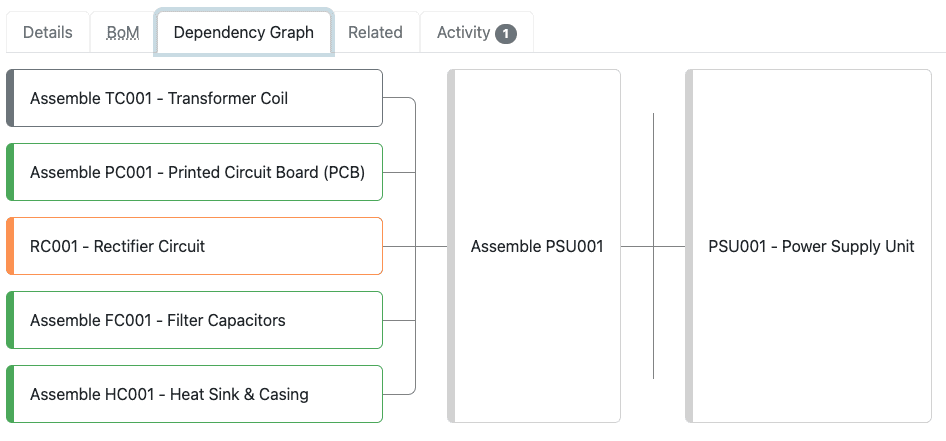
BOM Software Features
Avoid the risks of a manual spreadsheet system. Flowlens is easy to learn and easy to use.
Multi-Level BOMs
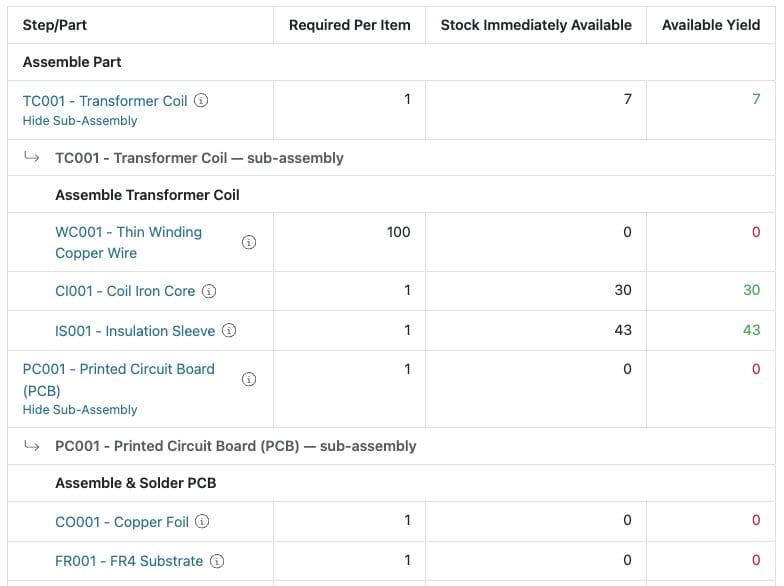
Build BOMs several levels deep, with sub-assemblies that carry their own parts lists, quantities and costs.
Suppliers And Pricing Per Part
Hold multiple approved suppliers and prices against each part, with full purchase history.
Import From Spreadsheets Or CAD
Bring BOMs in from Excel or CSV, including parts lists exported from your CAD system, and update in bulk.
Revisions And Change History
See when a BOM has changed, which revision a job was built to, and manage multiple active part revisions if required.
Serial And Batch Traceability
Record what went into each unit, with batch and serial numbers carried through dispatch and service.
Integrated Job Cards
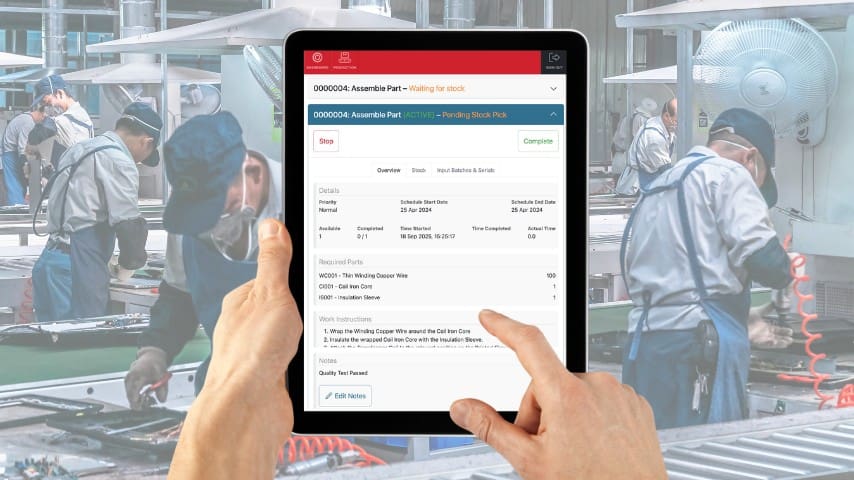
Job cards pull the BOM through to the shop floor, showing the pick lists and quantities.
Fewer Spreadsheets?
Most of our customers arrive with BOMs spread across CAD exports, spreadsheets and printed sheets on the shop floor, which works until a revision changes and three departments are holding three different versions.
Flowlens keeps one controlled BOM, cuts the manual re-keying between systems, and shows you what changed and when.
Keep Production Moving Cost-effectively
Our cloud software includes features like the Flowlens Production Job Card, which uses your product BOMs to show MRP demand for the required components or sub-assemblies. This allows you to prevent the expensive delays or even halts to manufacturing that can occur if you do not manage your BOM’s material requirements effectively.
With Flowlens, you can ensure all vital information is sufficiently detailed and up to date. This, in turn, enables more efficient and cost-effective production.
Works with Xero, QuickBooks and Sage 50

Flowlens integrates with your existing accounts software, linking with Xero, Sage 50 or QuickBooks.
- Issue invoices faster, improve cashflow
- Eliminate data keying errors and save time
- Monitor cash flow with real-time dashboard widgets
Real World Impact

“Prevents Overstock”
The stock graphs have helped us with our planning too, of when we need materials versus the job card outputs. So that’s helped us keep less stock and prevent overstock.
Alan Rex
Operations Director – DD Scientific Ltd
Frequently Asked Questions
Will Flowlens cope with a very large or complex BOM?
Yes. Customers run BOMs with over 1,500 lines across multiple levels. We usually suggest starting with a simpler product and building up as your team gets comfortable, so your most complex assembly doesn’t have to be the first one you import. See how this compares to MRPeasy if you’re weighing up options.
Can I edit or add parts to a BOM after production has started?
You can. On engineer-to-order and made-to-order builds, parts can be added or substituted on a live job card even when the BOM isn’t fully signed off, which keeps the job moving when a design change lands mid-build.
Does Flowlens track BOM versions and revision history?
It does. BOM versioning shows how a bill of materials has changed over time, so you can see what a previous revision looked like alongside the current one.
Can I import an existing BOM instead of building it from scratch?
Yes. BOMs import from Excel or CSV, including parts lists exported from your CAD system, and you can update them in bulk the same way. A direct CAD and PLM integration is coming soon.
Can Flowlens track batch numbers, serial numbers, and unit-of-measure conversions within a BOM?
Yes to all three. You can buy in one unit (boxes of 500, for example) and consume in another, with batch and serial traceability carried through production, dispatch and service history.
Can I control who's allowed to change a BOM?
Yes. Editing rights are set through user permissions, so you decide who can change a BOM and who can only view it. A sign-off based approval workflow is on the roadmap.
Unlock Your Growth Potential
Manual systems and processes are barriers to growth. With Flowlens BOM Software, integrated with our CRM, Production and Service tools, you can do more with less.
With BOM management built into the same system as your CRM, purchasing, production and service, your team can move between quoting, ordering, building and dispatching without re-keying anything.

Features To Grow Into
Custom Forms
Go paperless, and build forms to suit every need across your business.
Calendar Integration
Get Tasks in your Outlook or Google Calendar and stay on top of follow-ups.
Product Configurator
Handle variations and options to suit your customer. Cut out quoting errors.
Service Jobs+
Manage and grow after-sales equipment service revenues.
Sales Forecast
Manage sales pipeline, activity and forecast growth.
There's No Better Time to Start...
Book a discovery call today, and see how you can win back your freedom from spreadsheets, fixing errors and running out of stock.